Imagemap of the Main Screen of StarCalc 5.0

The image below maps out all the main screen features of StarCalc 5.0. Clicking on a feature will take you to the appropriate part of the User's Guide. Holding your mouse over a feature will give you a brief description of the button and its purpose. (The description will be displayed in the bottom status bar of your browser.)
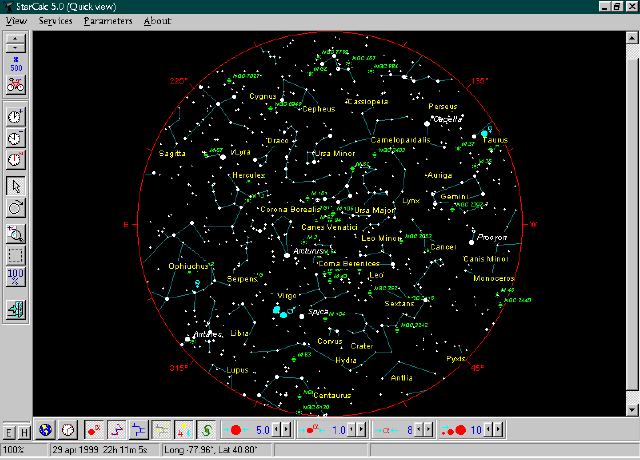


View Menu - basic Windows functions Service Menu - Zoom and Information Parameters Menu - display controls Programmer Information Automatically Advance Time Advance Time by One Time Step Advance Time by One Time Step Return to the Pre-Set Time Select Objects with this Cursor Rotate the Location of Axes on the Screen Zoom In at Intervals Zoom In On a Selected Region Return to a View of the Full Sky Exit the Program Main Display Screen Toggles the Equatorial Grid On and Off Toggles the Horizontal Grid On and Off Opens the Location Dialog Box Opens the Time Dialog Box Toggles the Stars On and Off Toggles the Constellation Lines On and Off Toggles the Constellation Borders On and Off Toggles the Constellation Names On and Off Toggles the Solar System Objects On and Off Toggles the Deep Sky Objects On and Off Sets the Minimum Star Magnitude Sets the Minimum Magnitude for Labeled Stars Sets the Font Size for Labels Sets the Number of Relative Brightness Levels Displays Your Current Zoom Level Displays the Current Time Displays Your Current Location

  To Kara's Homepage

  To the main Reference page